
This Midjourney V7 review is based on real testing, verified specs, and up-to-date pricing. We cover every meaningful dimension: image quality, V7 features, pricing plans, how to use the platform effectively, how to get the highest quality images out of it, and how it stacks up against the best free AI image generators available today.
Quick Verdict: Midjourney V7 remains the benchmark for artistic AI image quality in 2026. Its new personalization profiles, Draft Mode, and Omni Reference system make it significantly more powerful than V6. The $10/month Basic plan is the most accessible entry point, though most serious users will want Standard at $30/month for the volume they need.
Whether you are an entrepreneur building brand visuals, a marketer producing campaign assets, or a designer exploring creative concepts, this guide gives you everything you need to decide if Midjourney is worth it for your workflow in 2026.
1. What Is Midjourney? A Quick Overview
Midjourney is an independent AI image generation platform developed by Midjourney, Inc. and founded by David Holz. Unlike ChatGPT or Google Gemini, it operates entirely independently with no affiliation to OpenAI or Google. It uses a proprietary diffusion-based model to convert text prompts into high-quality images.
The platform built its reputation on distinctive visual quality: images that feel intentionally crafted rather than randomly generated. Midjourney occupies a unique space between photorealism and fine art, a quality that tools like DALL-E and Stable Diffusion have struggled to consistently replicate.
After years operating exclusively through Discord, Midjourney now has a full standalone web interface at midjourney.com. The transition has made it significantly more accessible, adding a gallery, folders, search, and lightbox features that were previously missing. You can explore Midjourney and compare it to other top tools in our AI Image Tools directory.
Key Facts About Midjourney in 2026
- Founded by David Holz, operates independently (no Google or OpenAI affiliation)
- No permanent free tier as of 2026; paid plans start at $10/month
- Uses a proprietary diffusion-based model, not a licensed third-party system
- Supports text-to-image, image-to-image, inpainting (Vary Region), and Pan/Zoom
- V7 is the current default model; V8.1 is available for users with Global Personalization Profiles
- The r/midjourney community has over 680,000+ members making it one of the most active AI image communities
2. What Is New in Midjourney V7? All Key Features Explained
Midjourney V7 is the most significant model upgrade the platform has released. It addresses the most common complaints about earlier versions: inconsistent prompt adherence, no personalization, limited character consistency, and slow generation for exploratory work.
Here is a breakdown of every major V7 feature:
| Feature | What It Does |
| Personalization Profiles | Learns your aesthetic preferences after rating images and biases future generations toward your style. |
| Draft Mode | Generates images 2-3x faster at lower GPU cost for rapid concept exploration before full renders. |
| Omni Reference | Maintain precise character or object consistency across multiple image generations. |
| Improved Prompt Adherence | Complex multi-element prompts are processed with significantly greater fidelity than V6. |
| Enhanced 4K Upscaling | Upscaler produces cleaner fine detail in hair, fabric textures, and architectural elements. |
| Vary Region (Inpainting) | Select and regenerate specific areas of an image while leaving the rest intact. |
| Pan and Zoom | Extend images beyond original borders for cinematic and widescreen compositions. |
| Aspect Ratios up to 4:1 | Unmatched flexibility for panoramic, banner, and cinematic format images. |
Personalization Profiles: The Standout V7 Feature
Personalization is arguably the most strategically important feature Midjourney has ever shipped. After rating a set of images, the model builds a personal aesthetic profile tied to your account. When activated, this profile biases generations toward the styles, colors, and compositions you prefer.
For creative professionals with a defined visual identity, this is transformative. It means Midjourney gradually becomes a tool that is tuned to your eye rather than producing generic results. No competitor currently offers a comparable personalization system built directly into the generation model.
Draft Mode: More Images for Less GPU Time
Draft Mode generates images roughly 2 to 3 times faster at lower GPU cost. This is designed for the ideation phase, when you need to explore 20 to 30 concept directions before committing to full-quality renders. It effectively extends the value of lower-tier plans by letting users iterate rapidly before spending Fast GPU hours on final outputs.
Omni Reference: Precise Character Consistency
Omni Reference solves one of the oldest frustrations in AI image generation: maintaining the same character or object appearance across multiple generations. You can upload a reference image and Midjourney V7 will preserve key identity attributes while applying different styles, settings, and compositions. This makes it genuinely viable for brand mascots, character design series, and product visualization workflows.
3. Midjourney V7 Pricing: All Plans Compared
Midjourney uses a GPU-hour subscription model. Each plan provides a set amount of fast GPU time per month, with unlimited Relax mode (slower generation) available on Standard plans and above. There is no permanent free tier as of 2026.
| Plan | Monthly Price | Annual Price | Fast GPU Hours | Best For |
| Basic | $10/month | $8/month (billed annually) | 3.3 hrs/month | Beginners, casual users |
| Standard | $30/month | $24/month (billed annually) | 15 hrs/month + Relax | Regular creators, marketers |
| Pro | $60/month | $48/month (billed annually) | 30 hrs/month + Relax | Professionals, agencies |
| Mega | $120/month | $96/month (billed annually) | 60 hrs/month + Relax | Heavy commercial use |
Is the Midjourney Basic Plan Worth It?
The Basic Plan at $10/month provides 3.3 fast GPU hours per month, which translates to roughly 200 standard image generations. There is no Relax mode and no Stealth mode (private generations). For casual users or those evaluating the platform, Basic is a reasonable entry point.
Active marketers, designers, or content creators will almost certainly need Standard ($30/month) for the generation volume required in professional workflows. The Relax mode on Standard is the real game-changer: once your Fast hours are exhausted, you can continue generating in Relax mode at no additional cost, just slower.
Pro Tip: Annual billing saves 20% across all plans. If you plan to use Midjourney consistently for client or brand work, the annual commitment pays off quickly. A Standard plan at $24/month annually versus $30/month monthly saves $72/year.
Midjourney V7 Pricing vs. Competitors
Midjourney Basic starts at $10/month with no free tier. By comparison, DALL-E 3 is included in ChatGPT Plus at $20/month. Adobe Firefly Standard costs $9.99/month but is limited in generation volume. Stable Diffusion is free to run locally if you have the hardware, but requires significant technical setup. For teams needing commercial use rights at scale, Midjourney Pro or Mega remains competitive given the quality of output.
4. Midjourney V7 Image Quality: What the Testing Shows
Image quality is where Midjourney V7 genuinely separates itself from the competition in 2026. Independent testing by the AI Video Bootcamp team showed Midjourney V7 producing more photorealistic outputs than V6 in 23 out of 30 standardized prompt tests, with skin textures, fabric detail, and shadow rendering all showing measurable improvement.
What Midjourney Does Better Than Any Other Tool
- Artistic depth: images feel crafted, not generated. Lighting, composition, and color harmonics are consistently sophisticated.
- Stylistic range: from hyperrealistic photography to painterly illustration to cinematic film stills, V7 handles the full spectrum.
- Compositional intelligence: subjects are positioned with genuine visual logic, not just centered in frame.
- Texture rendering: fabric, skin, wood grain, and metallic surfaces are rendered with industry-leading fidelity.
- Cinematic aesthetics: depth of field, lens effects, and lighting moods that rival professional photography at a fraction of the cost.
Where Midjourney Still Has Limitations
- Text in images: Midjourney still struggles with accurate text rendering within generated images. For designs requiring legible text overlays, post-processing in a design tool is typically necessary.
- Anatomical accuracy: hands and complex body positions can still produce errors, though V7 shows meaningful improvement over V6.
- No native video generation: unlike competitors such as Runway or Kling AI, Midjourney does not currently generate video (V8.1 added some animation capabilities but video generation is not a core feature).
- No free tier: for users who cannot commit to $10/month upfront, the barrier to entry is higher than free alternatives like Bing Image Creator or Adobe Firefly free tier.
5. How to Use Midjourney V7: Step-by-Step Guide
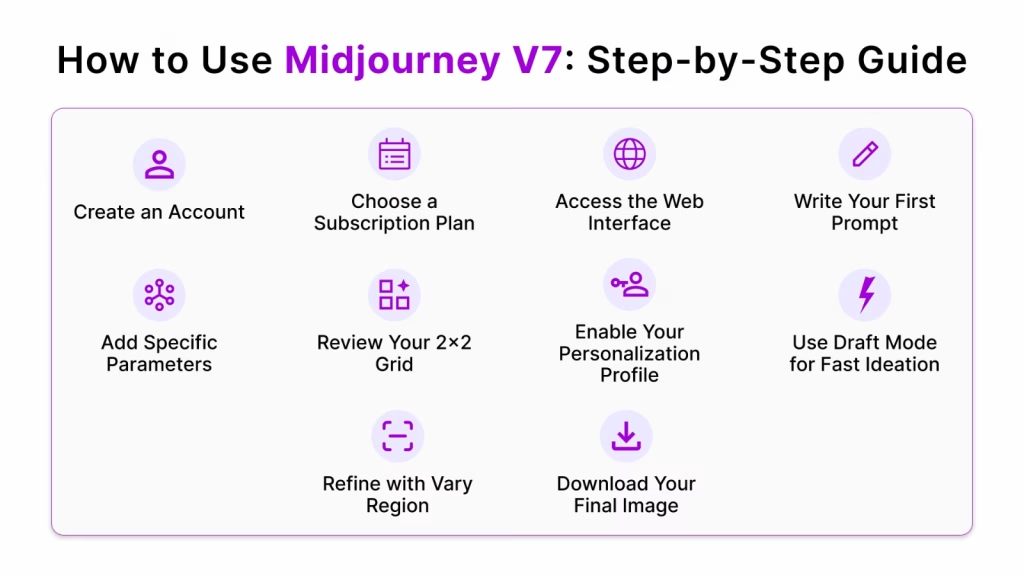
Getting started with Midjourney V7 is straightforward compared to earlier versions, when Discord was the only interface. Follow these steps to generate your first images.
- Create an account at midjourney.com using a Google or Discord login.
- Choose a subscription plan. Basic ($10/month) for casual use; Standard ($30/month) for regular creative work.
- Access the web interface. Navigate to the Imagine bar on your dashboard. Discord is still supported but no longer required.
- Write your first prompt. Be specific: subject, style, lighting, mood, and composition all improve output quality. Example: “A futuristic city skyline at dusk, cyberpunk aesthetic, neon reflections on wet streets, wide angle lens, cinematic”.
- Add parameters. Append –ar 16:9 for widescreen, –v 7 to ensure V7 model, –stylize 100 for more artistic output, or –chaos 20 for more variation between results.
- Review your 2×2 grid. Four image variations are returned. Use U1 to U4 to upscale individual results or V1 to V4 to generate variations from a preferred output.
- Enable your Personalization Profile. Rate images in your account settings to build your aesthetic profile, then append –p to prompts to activate it.
- Use Draft Mode for fast ideation. Append –draft to prompts to generate faster at lower GPU cost during exploration phases.
- Refine with Vary Region. Open any upscaled image and use Vary Region to select specific areas for targeted regeneration.
- Download your final image. From the web gallery, open the upscaled image and use the download button for full-resolution export.
How to Download High Quality Images from Midjourney
The most common mistake new Midjourney users make is right-clicking and saving from the 2×2 generation grid. These are compressed preview thumbnails, not the full-resolution images. To download at maximum quality:
- Always upscale your chosen image first using U1, U2, U3, or U4 before downloading.
- From the web interface, open the upscaled image in your gallery and use the download icon in the top right corner.
- For even higher resolution, use the Upscale (Creative) or Upscale (Subtle) options that appear after the initial upscale. Creative mode adds new detail; Subtle mode sharpens without altering the composition.
- Upscaled images can reach up to 4K resolution depending on your original generation settings. The –ar parameter and subject complexity affect final output dimensions.
How to Improve Image Quality in Midjourney V7
The biggest quality gains come from prompt specificity and parameter knowledge, not from relying on default settings. Key techniques:
- Specify lighting explicitly: “golden hour lighting”, “studio lighting with soft box”, “overcast natural light” all produce meaningfully different results than an unspecified scene.
- Add camera and lens details: “shot on 85mm f/1.4”, “wide angle 24mm”, “macro photography” guide V7 toward compositional approaches that match real photography.
- Use the –stylize parameter: values from 0 (literal prompt adherence) to 1000 (maximum artistic interpretation). Most professional work sits in the 100 to 300 range.
- Enable your personalization profile (–p) after building it through image ratings. This single step often produces the most noticeable quality improvement for consistent creative work.
- Combine image prompting with text prompts: upload a reference image as a visual starting point and add a text prompt to guide the direction. V7 handles this combination significantly better than V6.
6. Midjourney V7 vs. Competitors: Full Comparison
How does Midjourney V7 compare to the best free AI image generators and paid alternatives? Here is the full breakdown:
| Feature | Midjourney V7 | DALL-E 3 | Adobe Firefly | Stable Diffusion |
| Image Quality | Best-in-class | Very Good | Good | Varies |
| Pricing | $10–$120/month | Included w/ ChatGPT | $54.99/month (Firefly+) | Free (self-hosted) |
| Free Tier | No | Yes (limited) | Yes (limited) | Yes |
| Prompt Control | Excellent | Good | Moderate | Advanced |
| Personalization | Yes (V7 Profiles) | No | Style Match | LoRA fine-tuning |
| 4K Upscaling | Yes | No | Yes | Yes (plugins) |
| Commercial Use | All paid plans | Yes | Yes | Yes |
| Ease of Use | Moderate | Easy | Easy | Complex |
Midjourney V7 vs. DALL-E 3
DALL-E 3 (via ChatGPT) is the closest mainstream alternative. It is easier to use and handles text within images better than Midjourney. However, Midjourney V7 consistently produces more visually sophisticated outputs in most artistic and photorealistic categories. The key decision factor: if you already pay for ChatGPT Plus at $20/month, DALL-E 3 is included and may be sufficient. If image quality is the priority and you are willing to pay separately, Midjourney V7 wins.
For a full breakdown of AI chatbots and their capabilities, see our comparison of ChatGPT vs Claude vs Gemini which covers the broader AI tool landscape.
Midjourney V7 vs. Adobe Firefly
Adobe Firefly is the strongest choice for users already in the Adobe Creative Cloud ecosystem. Its outputs are commercially safer due to training data sourced from Adobe Stock, and it integrates directly into Photoshop and Illustrator. For pure image quality and creative range, Midjourney V7 is stronger. For safe commercial licensing and workflow integration, Firefly has a structural advantage.
Midjourney V7 vs. Stable Diffusion
Stable Diffusion is free to run locally and offers unmatched customization through community models, LoRA fine-tuning, and plugins. For technical users with the hardware, it is a more flexible (if more complex) system. For everyone else, Midjourney V7 delivers better results with dramatically lower friction. The $10/month Basic plan is a reasonable trade for the quality and ease Midjourney provides.
7. Who Should Use Midjourney V7?
Midjourney V7 is not the right tool for everyone. Here is an honest breakdown by user type:
Midjourney V7 Is a Great Fit For:
- Designers and illustrators who need the highest quality AI-generated visuals for client work or personal projects.
- Content creators producing brand visuals, social media assets, and marketing materials that require a consistent aesthetic identity.
- Marketing teams and agencies creating campaign imagery, product visualizations, and conceptual art at scale.
- Entrepreneurs and startups building brand identity materials without the budget for professional photography or illustration.
- AI image generation enthusiasts who want access to the most artistically capable model on the market.
Midjourney V7 May Not Be Ideal For:
- Beginners who need immediate, simple results without a learning curve. Tools like Adobe Firefly or DALL-E 3 via ChatGPT are more accessible.
- Users who need text rendered accurately within images. DALL-E 3 handles this better.
- Teams that need video generation. Look at our AI Video Tools category for dedicated tools.
- Users on a zero budget. The lack of a permanent free tier means you need to commit to at least $10/month. Free alternatives include Bing Image Creator and Adobe Firefly free tier.
8. Real-World Use Cases for Midjourney V7
Understanding what Midjourney V7 can do in actual professional workflows is more useful than abstract benchmarks. Here are concrete examples of how the platform is being used effectively in 2026.
Brand Identity and Visual Direction
Entrepreneurs and brand designers use Midjourney V7 to rapidly prototype visual directions for new brands. By generating 50 to 100 concept images across different aesthetic directions, you can present mood boards and style options to clients in hours rather than days. Combined with dedicated AI branding tools, Midjourney becomes part of a powerful visual identity workflow. For logos and brand identity specifically, explore the best AI logo generators available today.
Marketing Campaign Imagery
Marketing teams use Midjourney V7 to produce hero images, social media visuals, and conceptual campaign artwork. The Personalization Profile feature ensures a consistent visual style across a campaign without briefing a photographer each time. A typical workflow: define your campaign aesthetic in the personalization profile, then generate assets with the –p flag for stylistic consistency.
Product Visualization
E-commerce brands and product designers use Midjourney for early-stage product concept visualization. With Omni Reference, you can maintain consistent product appearance across different backgrounds, lighting scenarios, and use contexts. This is particularly effective for apparel, lifestyle products, and packaging design early in the development process.
Content and Editorial Illustration
Blog editors, digital magazines, and newsletters use Midjourney V7 to produce custom editorial illustrations. The quality gap between Midjourney and stock photography is narrow enough that, for the right aesthetic, Midjourney-generated images can replace commissioned illustration at a fraction of the cost.
9. Midjourney V7 Pros and Cons: Honest Assessment
Pros
- Best-in-class image quality: consistently the benchmark for artistic and photorealistic AI image generation.
- Personalization Profiles: the most sophisticated aesthetic customization system available in any AI image tool.
- Draft Mode: extends GPU hour value by allowing fast, cheap exploration before committing to quality renders.
- Omni Reference: the first practical solution for character and object consistency across AI-generated images.
- Wide parameter system: –stylize, –chaos, –weird, –ar and more give power users unmatched control.
- Active community: 680,000+ member subreddit provides tutorials, prompt libraries, and technique sharing.
- Commercial use rights: all paid plans include rights to use images commercially.
Cons
- No free tier: unlike Adobe Firefly, Bing Image Creator, or the free version of Leonardo AI, Midjourney requires a paid subscription.
- Text in images: still unreliable for designs requiring accurate text rendering within generated images.
- No native video: competitors like Runway, Kling AI, and even DALL-E (via Sora) offer video generation that Midjourney does not match.
- Learning curve: prompt engineering and parameter knowledge significantly affect output quality. Beginners may struggle early.
- No API for standard plans: API access requires Pro or Mega tier, limiting automation for smaller teams.
11. Frequently Asked Questions
Is Midjourney V7 worth it in 2026?
Yes, for designers, marketers, and creators who need professional-grade AI images. V7 delivers better prompt adherence, personalization profiles, and 4K upscaling. At $10/month for Basic, it remains one of the best value AI image generators available. If visual quality is your priority, the subscription is justified.
Is there a free trial for Midjourney in 2026?
Midjourney does not offer a permanent free tier as of 2026. Limited trial access has appeared periodically on the platform, but it is not guaranteed. New users must subscribe to a paid plan starting at $10/month to generate images. For free alternatives, check the AI Image Tools category on Vhiz AI.
What is new in Midjourney V7?
Midjourney V7 introduced Omni Reference for precise character consistency, improved prompt adherence, Draft Mode for fast ideation at lower GPU cost, enhanced upscaling with better fine-detail retention, and personalization profiles that learn your aesthetic preferences over time.
How do I download high quality images from Midjourney?
From the Midjourney web interface, open your image in the gallery and click the download icon. For the highest resolution, upscale your image using U1-U4 buttons before downloading. Upscaled images are delivered at up to 4K resolution. Avoid right-click saving from the grid as these are compressed thumbnails.
Is the Midjourney Basic Plan worth it?
The Basic Plan at $10/month provides 3.3 fast GPU hours per month, which equates to roughly 200 standard image generations. It has no Relax mode or Stealth mode. For casual users or those testing the platform, Basic is a cost-effective entry. Active creators typically need Standard ($30/month) for enough generation volume.
How does Midjourney V7 compare to DALL-E 3?
Midjourney V7 produces superior artistic and photorealistic image quality in most comparisons. DALL-E 3 is easier to use (available via ChatGPT) and handles text within images better. Midjourney requires a standalone subscription while DALL-E 3 is included with ChatGPT Plus at $20/month, making DALL-E more cost-effective for existing ChatGPT subscribers.
Can I use Midjourney images commercially?
Yes. All paid Midjourney plans include commercial use rights. If you earn over $1 million annually from Midjourney-generated content, you are required to subscribe to the Pro or Mega plan. Free trial images (when available) are not licensed for commercial use.
How do I improve image quality in Midjourney V7?
Use specific, detailed prompts describing subject, lighting, style, and camera settings. Add parameters like –ar 16:9 for aspect ratio, –q 2 for higher quality, and –stylize values above 100 for more artistic output. Use the Vary Region tool to refine specific areas. Enable your personalization profile to bias outputs toward your preferred aesthetics.