
For a long time, people either hired professional designers to get a good logo, which often costs a lot, or they relied on generic templates that ended up looking the same as everyone else’s. There was not much in between.
AI logo design tools have changed that space quite a bit.
Today, AI tools can create a professional-looking logo in a few minutes without needing design skills. This has made logo design more accessible for startups, freelancers, and small businesses. But there is an important detail that most “best AI logo maker” reviews do not mention clearly. Not every tool is truly AI-driven, and not every result is actually usable for real branding. Some tools still rely on simple template systems and just layer automated prompts on top of them.
To find out more, we tested seven of the most common AI logo design tools using a real-world brief to ensure an accurate and consistent comparison.
The company under evaluation is NovaBrew, a coffee subscription service aimed at young adults aged 25 to 40. The design style is modern and upmarket, with a touch of the exotic, with navy and amber as the main brand colors.
We evaluated each AI logo generator using the same criteria.
- Design Quality: How professional and unique the logo looks
- Customization: The extent to which you can design
- Ease of Use: How easy it is for a non-designer to use
- AI Authenticity: How much of the design is AI and how much is a template
- Value for Money: Whether the pricing matches the quality delivered
AI Logo Maker Feature Comparison
| Tool | Logo Quality | Custom Creativity | Vector Output | Originality | Editing Tools | Mockups |
| Zoviz | High, modern branding | Moderate–High | Yes (SVG, EPS) | Medium–High | Easy editor | Full brand kit + mockups |
| Logo Diffusion | High, professional | Very high | Yes | Unique every time | Advanced editor | AI mockup generator |
| Canva Logo Maker | Template-based | Moderate | Limited | Medium | Basic tools | Built-in basic |
| LogoAI.com | Template hybrid | Low | Limited | Low | Limited | Basic |
| Shopify Hatchful | Basic | Low | No | Low | Minimal | Basic |
| Wix Logo Maker | Template-based | Low | Paid | Low | Minimal | Basic |
| Midjourney | Artistic, not clean | High but illustrative | No | Medium | None | None |
Zoviz
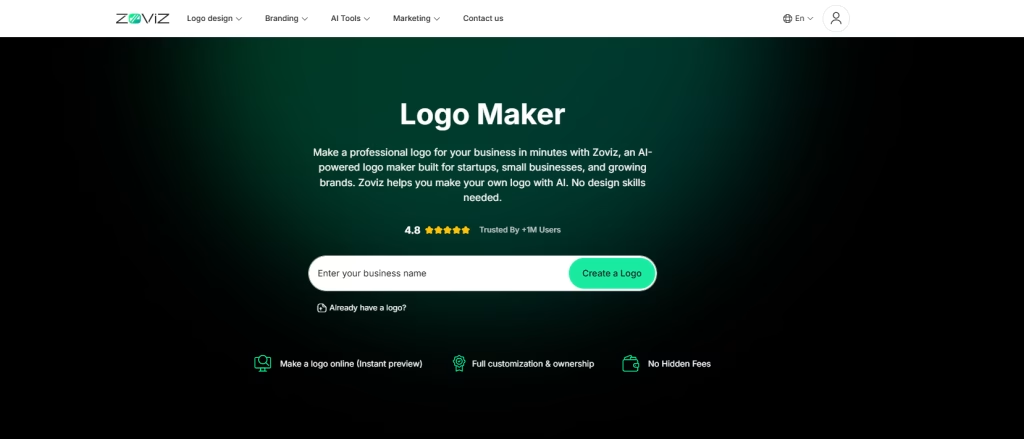
Zoviz is an AI logo maker tool that helps businesses create logos and complete brand kits quickly. It uses machine learning to generate logo designs based on industry type, style preferences, and color choices. It targets beginners and brands that want a faster approach to brand design. The platform serves both amateurs and professionals who need to build a brand identity more efficiently. It positions itself among the tools people often evaluate when searching for the best logo design solutions for businesses.
How We Tested It
Zoviz follows a simple and guided process:
- Enter brand name.
- Describe your ideal icon in a few words
- Choose brand vibe
- Provide your tagline or slogan
For NovaBrew, Zoviz generated clean and modern logo options focused on coffee-related themes. This fits well for anyone trying to design a logo online free without heavy design experience.
What the logo looks like:
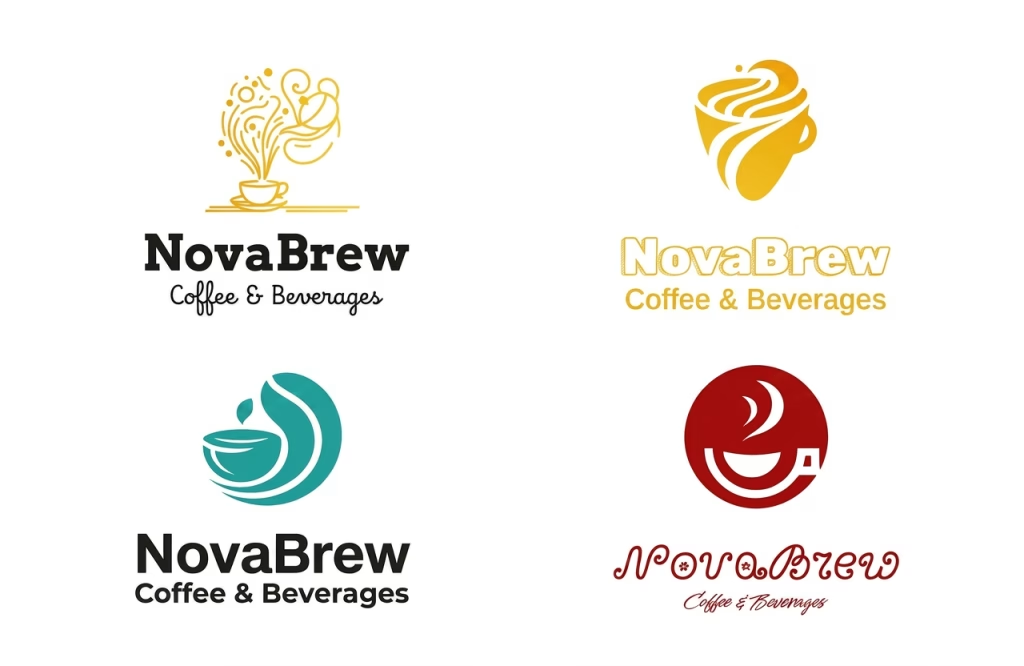
For NovaBrew, Zoviz generated a set of clean and modern logo options focused on coffee-related themes. Most designs used simple icons like coffee cups or beans combined with minimal typography. The layouts feel balanced and easy to read, which makes them suitable for digital use.
| What Fell Short | What We Liked |
| Designs can feel generic with limited uniqueness. Customization is basic and lacks advanced editing control. | All-in-one branding with logo, business cards, letterheads, social media assets, and brand book. Fast and simple process suitable for non-designers. Supports over 100 languages, including RTL scripts. High-resolution outputs in multiple formats including SVG and EPS. One-time pricing model with no recurring subscription. |
Best for startups and small businesses that need a quick and affordable branding solution. It works well for creating a complete brand kit without much effort.
Logo Diffusion
Logo Diffusion is considered the best AI tool for logo design that uses diffusion-based AI, the same type of AI used by image generators such as Stable Diffusion but that has been trained on only logo and icon data.
Unlike tools that ask you to pick from a style quiz, Logo Diffusion works from text prompts, giving you genuine creative control.
How We Tested It
We used the following prompt for our NovaBrew brief:
Prompt used:
Minimalist coffee brand logo for ‘NovaBrew,’ a specialty subscription service. Deep navy blue and warm amber color palette. Style: modern geometric with a subtle astronomical or celestial motif. Clean sans-serif wordmark. Vector-style, no gradients, suitable for dark backgrounds.
What the logo looks like:
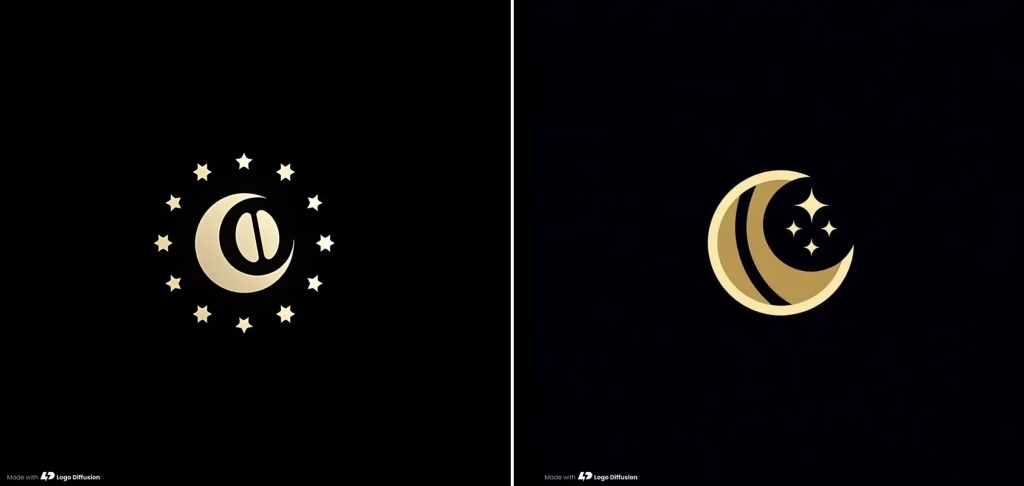
The logo is simple and minimal, with a black background and gold scheme. At the center, a simple abstract design with a crescent moon and circular shape. It is surrounded by small star icons in a circular manner, suggesting a space or space theme.
The design has a refined look. The black and gold tones make the icon easy to distinguish. It is also simple, which means it will not be lost when scaled down to smaller sizes. This makes it work as an app icon, website icon or simple mark.
But it lacks text (a wordmark). This leaves it as an incomplete branding logo. When used, you would need to add text in a logo design tool to complete the branding.
In all, this is an AI-generated logo or icon, not a logo itself. It resembles what many consider the best logo designs when AI creativity is allowed full freedom.
| What Fell Short | What We Liked |
| Text rendering in logos can be inconsistent, especially in wordmarks. No built-in brand kit or mockup tools for a full branding workflow. Output quality depends heavily on prompt-writing skills. | Genuinely original AI logo outputs, not template-based designs. Wide style range across presets (minimal, modern, futuristic, geometric). SVG vector export available (limited on free tier) Fast, prompt iteration for quick logo idea generation. |
Best for designers, creatives, and startups looking for original AI-generated logo concepts instead of template-based logo makers.
Canva Logo Maker
Canva is one of the most widely used platforms for logo design online free, particularly for non-designers. Its Logo Maker is part of its template system, with basic AI suggestions that help users pick styles and layouts quickly. It is simple, fast, and free to start, which makes it a popular free online logo design option.
How It Was Tested
The process begins by entering a brand name and selecting an industry. Next, Canva presents a selection of logo styles like minimal, bold or playful. Users then select a template and edit the logo in Canva’s drag-and-drop editor.
For NovaBrew, “coffee/food & beverage” was selected along with a “modern” style. A template was then adjusted to match a navy and amber color theme.
What the logo looks like:
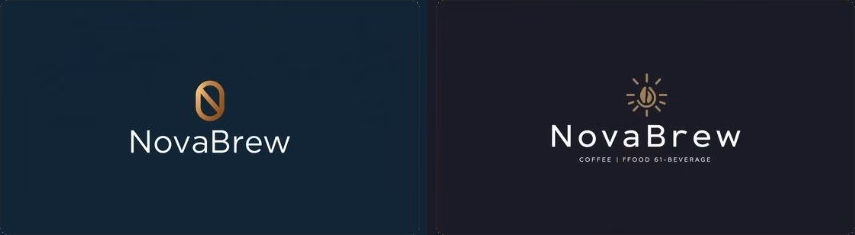
Canva generated two logo variations for the brand “NovaBrew” in the coffee/food and beverage industry. One version focuses on a sleek, premium identity, designed for a boutique coffee brand with a clean and refined visual style. The second version highlights a more energetic and welcoming feel, suitable for a broader coffee, food, and beverage brand that wants a warm and approachable presence.
Hence, the first logo variation focuses on simplicity, luxury, clean structure, and color. The second variation leans toward a more expressive brand identity, aiming to feel more open, friendly and suitable for wider product offerings.
| What Fell Short | What We Liked |
| Not fully AI-generated, most designs are based on pre-made templates. Many logos have a recognizable Canva template style, which reduces uniqueness. SVG export is locked behind the Pro plan. | Large library of logo templates and icons for quick selection. Easy integration with Canva Brand Kit for consistent branding. Simple drag-and-drop editor that is beginner-friendly. Fast workflow, can produce a usable logo in under 10 minutes. |
Best for small businesses and non-designers using Canva, who want a fast, social-media-friendly logo. If you want to design a logo free online, this is among the easiest entry points available.
LogoAI.com
LogoAI is an online logo design tool that takes your brand name and preferences then generates a range of logo designs to choose from. After selecting a design, users can customize fonts, symbols, and colors. The system uses an AI engine to suggest combinations, but it mainly works with standard logo elements rather than creating fully original shapes.
LogoAI is built for speed and simplicity. It helps users quickly create logo designs online with minimal input. It also offers animated logo export, which adds value for websites and digital branding.
How It Was Tested
The LogoAI process is simple and fast:
- Enter the brand name and choose the industry
- Select color preferences
- Pick font styles
For NovaBrew, the setup included “coffee & beverages” as the industry, a warm color palette, a handwritten font style, and geometric or abstract symbols. The tool generated multiple logo options within seconds.
What the logo looks like:
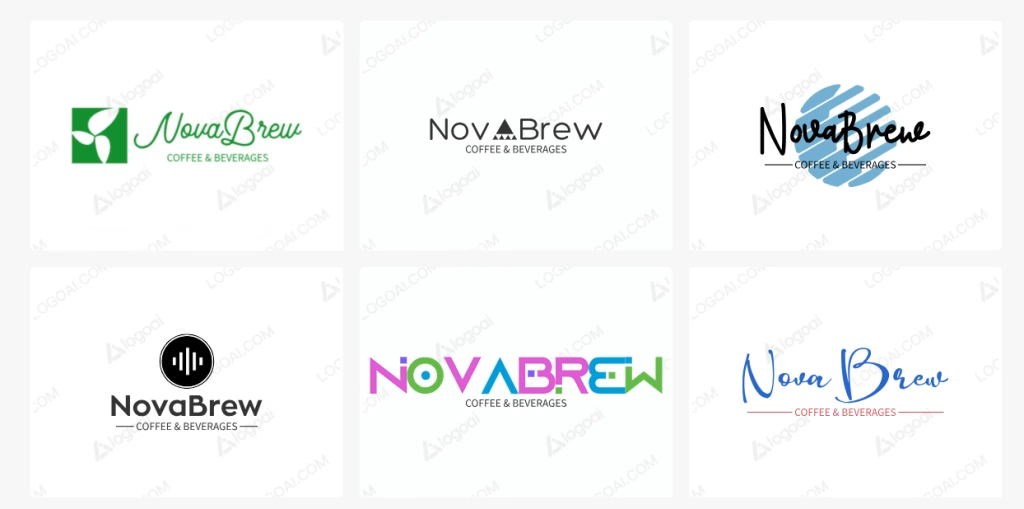
LogoAI delivered results in under 30 seconds. The logos looked clean and usable but slightly more generic compared to tools like Looka.
Some logos follow a minimal style, such as black-and-white geometric layouts, while others use more color and expressive elements, such as bold typography or brush-style backgrounds. These variations reflect different brand personalities, from modern and clean to more playful and approachable.
| What Fell Short | What We Liked |
| Many designs feel template-based. Uses non-exclusive elements, so originality is limited. Not suitable for complex or highly refined logo work. | Fast AI-generated logo suggestions. Simple editor for layout, fonts, and colors. Includes brand tools like stationery and mockups. |
Best for small businesses and freelancers who need a clean online logo design free result fast, without any learning curve.
Shopify Hatchful
Shopify Hatchful is a completely free logo design tool designed for e-commerce businesses and Shopify store owners. It helps users create online logo designs for stores, social media, and basic branding. There are no subscriptions, no hidden costs, and no watermarks, making it one of the most accessible free logo generators.
How It Was Tested
The process is very simple:
- Enter brand/company name
- Select usage (website, social, print)
For NovaBrew, “food & beverages” was selected in a modern, minimal style, targeting web and social use.
What the logo looks like:
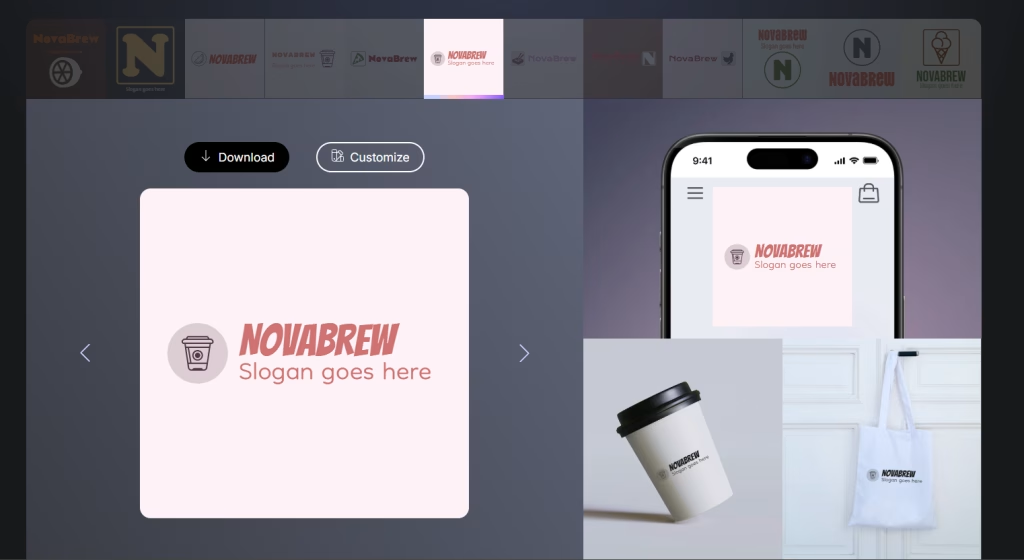
Shopify Hatchful generated a small set of logo options, usually around 6 to 8 variations. Most designs followed a similar structure, with a simple icon placed above or beside the brand name and a clean, center-aligned layout.
For NovaBrew, the output mainly included basic coffee-related icons paired with standard sans-serif fonts. The designs looked neat and usable, but there was little variation in style. Each logo felt like a slight adjustment of the same template rather than a completely new concept.The overall quality is decent for a free logo design online tool. The logos work well for Shopify store headers, social media profiles, and quick branding needs. However, they lack uniqueness and do not offer a strong brand identity.
| What Fell Short | What We Liked |
| No SVG or vector file export. Templates look dated and generic. Very limited customization options. | Completely free with no hidden costs. Download includes multiple PNG sizes. Transparent background files included Very fast process, under 2 minutes. |
Best for: Shopify store owners who need a placeholder logo at zero cost, with plans to upgrade to the best logo design app or professional service later.
Wix Logo Maker
Wix Logo Maker is an AI logo design tool that prompts you with questions about your brand and design, then generates logo designs for you to edit. You can change icons, fonts, colors and download the logo with additional brand assets. The system uses shared design elements, so some starting designs may look generic but the built-in editor lets users customize further, making it a solid online logo design tool for most users.
It works through a guided style quiz, where users select preferences to help the AI understand their visual direction. The tool is also closely integrated with the Wix website builder, making it useful for users building both a logo and a website.
How It Was Tested
The setup process is more detailed than most logo makers. For NovaBrew, “food & beverage” was selected, with a focus on modern, warm, and minimal styles. The quiz helped guide the AI toward more relevant outputs.
What the logo looks like:
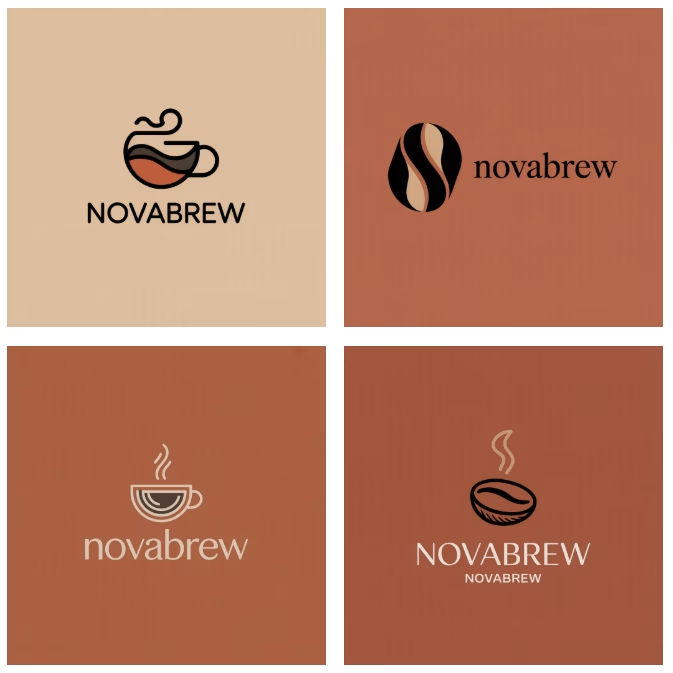
Wix Logo Maker generated a set of logo variations for NovaBrew that felt more refined and design-focused than those from simpler tools. The outputs showed clear influence from the style quiz, with consistent use of warm tones, minimal layouts, and coffee-related symbols.
Most logos followed a clean and modern direction. One version used a simple coffee cup icon with smooth line work placed above a bold “NOVABREW” wordmark, creating a clear and balanced layout. Another variation explored a more abstract route, using a bean-shaped icon with flowing curves paired with a serif-style “novabrew” text, giving it a slightly more premium and boutique feel.
A few designs leaned toward softer, lifestyle branding. These used lighter tones, rounded icons, and lowercase typography, which made the brand feel more casual and approachable. There were also variations with coffee bean and steam elements, keeping the identity clearly tied to the coffee space without overcomplicating the design.
Overall, the results showed better variety than basic template tools, but still stayed within safe design patterns. The logos looked clean and usable, with a mix of modern, premium, and casual styles. While not highly unique, they offered enough flexibility to position NovaBrew as either a refined coffee brand or a more relaxed café-style business.
| What Fell Short | What We Liked |
| Initial logo results can feel generic and require editing. Limited font library with no option to upload custom fonts. Uses shared design elements, so logos may not be unique. The free version only provides low-resolution files. Additional edits may require extra cost after purchase. Not suitable for complex or highly detailed logo design. | Flexible drag-and-drop editor with strong control over colors, fonts, and layout. Easy setup with AI-generated logo suggestions based on user input. High-resolution SVG files available for print and scaling. One-time pricing option for logo purchase. Smooth integration with Wix website builder and marketing tools. Full commercial rights are included after purchase. |
Best for: Wix website owners building their brand identity, or anyone who wants SVG output at a fair price. It is also a solid pick among the best logo design sites for those who want an all-in-one website and branding workflow.
Midjourney
Midjourney is an AI image generator, not a dedicated logo design tool. It is widely used for creating high-quality visuals with strong style and detail. It can generate logo concepts when prompted correctly, but it requires more effort and design expertise than traditional logo design tools for businesses.
Midjourney is one of the most creative and visually expressive AI models available. It produces rich, artistic visuals with strong texture, mood, and style. For logo design, it works well for exploring ideas, moodboarding, and testing different visual directions.
This same strength can become a limitation. Logos need simplicity and consistency, while Midjourney often adds extra detail, gradients, or effects that are impractical for real-world branding. Typography can also be inconsistent, and outputs are raster images, not vector files. Most results need to be rebuilt in the best logo design software before they are usable.
So, Midjourney works best as an idea-generation tool, not a final logo solution.
How It Was Tested
Midjourney was used through Discord with a structured prompt for NovaBrew:
/imagine prompt: vector logo design for “NovaBrew” specialty coffee brand,
minimal geometric icon combining coffee and celestial/astronomy theme,
deep navy #1B2B5E and warm amber #D4900A color palette, clean sans-serif
wordmark, white background, professional brand identity, flat design,
no gradients, SVG style, dribbble quality –style raw –stylize 750 –ar 1:1
What the logo looks like:
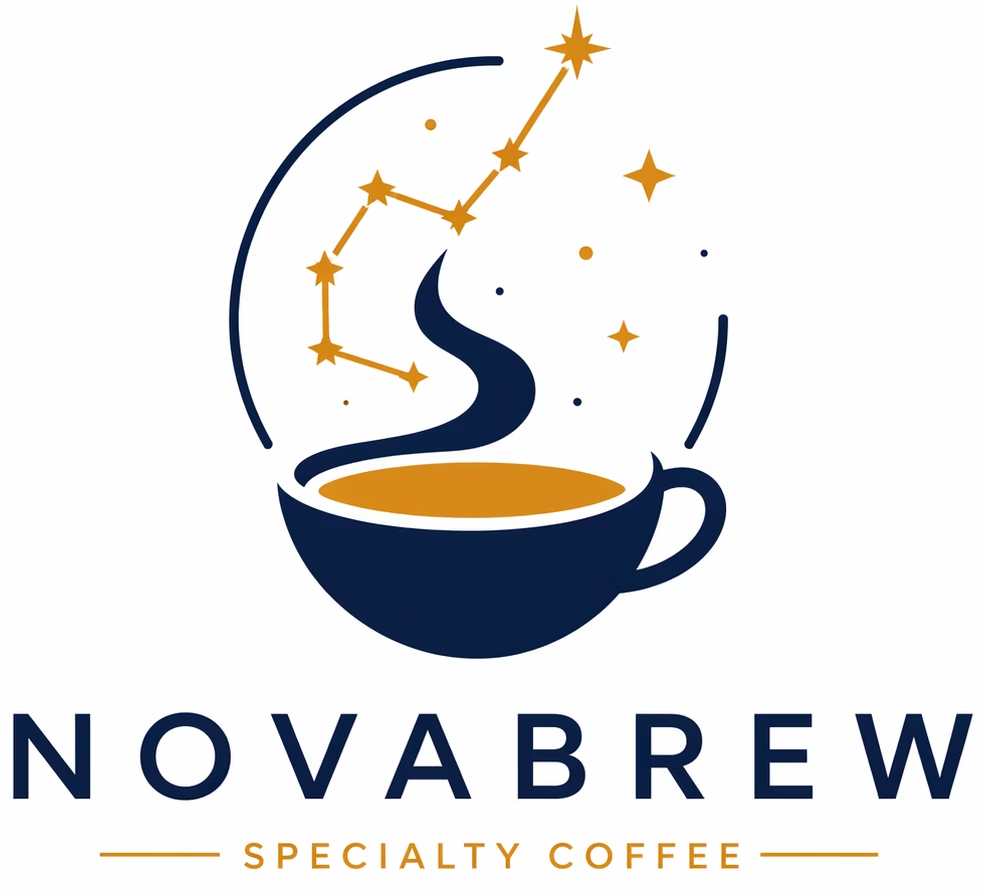
Midjourney generated a clean and high-quality logo concept for NovaBrew that clearly combines coffee branding with a subtle astronomy theme. The main icon features a navy coffee cup filled with an amber tone, creating a strong and modern color contrast. The steam rising from the cup is shaped in a smooth, flowing style and connects with small star elements, giving the logo a unique celestial touch.
The design stays simple and balanced. A partial circular frame and small star details help build the concept without making it look busy. This keeps the logo easy to recognize and suitable for different uses like websites, packaging, or social media.
The “NOVABREW” wordmark is placed below the icon in a clean sans-serif font with good spacing, making it easy to read. The small “Specialty Coffee” tagline adds context without distracting from the main design.
The result looks like a premium coffee brand logo. It feels more refined and creative than most ai tools for logo design. Since the output is not in vector format, it would still need to be recreated or traced in a design tool before it can be used for printing or large-scale branding.
| What Fell Short | What We Liked |
| Text rendering is inconsistent and often inaccurate. No vector file export, only raster images that require manual conversion. Tends to add too much detail, making logos less practical for real use. Limited editing control, as small changes require regenerating the design. Dependence on the Discord interface can feel less user-friendly for some users. | Unmatched artistic creativity with strong mood, texture, and atmosphere. Rapid ideation with the ability to generate many logo variations from a single prompt. Wide range of high-end styles, including minimalist, retro, and artistic concepts. Advanced prompt controls, like style and reference parameters, for better results. Strong performance in creating unique and visually distinct icons. |
Best for: Creative professionals, brand designers, and entrepreneurs willing to invest time in prompting for truly unique, high-art logo concepts.
6 Ways to Get Better Results From Any AI Logo Tool
1. Use hex codes for colors
Always define your color palette using hex codes instead of general names. For example, “#E8A020” gives more accurate results than saying “orange” or “yellow.” Most online logo design tools respond better to precise color input.
2. Tell the tool what to avoid
Add negative instructions to guide the output. Mention things like “no coffee cups,” “no vintage style,” or “no complex icons.” This helps narrow down results and avoids unwanted designs when you design a logo online.
3. Generate multiple options first
Create 10 to 20 logo variations before editing anything. This helps you spot the strongest design direction early. Once you find a good concept, focus on refining that instead of starting over.
4. Check the logo on different backgrounds
Test your logo on both light and dark backgrounds. A best logo design result on white may not work on dark websites or social media. Make sure it stays clear and readable in both cases.
5. Use specific design style references
Instead of using general terms like “modern,” try specific styles such as “Bauhaus,” “Art Deco,” or “Swiss Style.” These terms give AI tools clearer direction and lead to better design results.
6. Export in SVG format when possible
Always choose SVG files if the option is available. SVG logos scale to any size without losing quality, which makes them ideal for print, websites, and branding. PNG files can lose clarity when resized. . This is one of the most important tips when using any logo design tool.
Our Final Verdict
There is no single best logo design software that works for everyone. The right choice depends on your budget, timeline, and design needs.
Looka is the best AI logo maker for polished results and a full brand kit. Midjourney offers the most creative logo concepts, but requires design skills and extra editing. Logo Diffusion is a strong option for more original, AI-generated logo designs. Shopify Hatchful is ideal if you need a free logo fast.
AI logo tools can help you create logo design online at a lower cost, but they do not replace professional logo design. Choose the tool that matches your goals, whether it is speed, cost, or creative control.