
You spent two hours polishing your resume. A piece of software rejected it in about seven seconds, and no human ever saw it.
That is the reality of job hunting in 2026. Before a recruiter reads a single word, your resume usually passes through an applicant tracking system, and 97.8% of Fortune 500 companies now run one. On top of that, eye-tracking research from The Ladders found that recruiters spend an average of just 7.4 seconds on the first scan of a resume that does make it to a human. Learning how to write a resume with AI is no longer a shortcut for lazy applicants. It is how you compete against algorithms and short attention spans at the same time.
This guide walks you through the exact system: what “writing a resume with AI” really means, the seven-step process to do it well, the best AI tools for each type of job seeker, copy-and-paste prompts that work, and how to keep your resume sounding like a human instead of a robot. At Vhiz AI, we test and catalog hundreds of AI tools, so the recommendations here are based on what actually performs, not marketing hype.
What Does It Mean to Write a Resume With AI?
Writing a resume with AI means using an artificial intelligence tool, whether a general chatbot like ChatGPT or a purpose-built ai resume builder, to help you draft, structure, rewrite, and optimize your resume. The AI does the heavy lifting on wording, formatting logic, and keyword matching. You supply the raw truth of your experience and the final judgment on tone and accuracy.
It helps to be clear about the two very different ways people use AI here, because they lead to very different results.
The wrong way: AI as a ghost writer
You type “write me a resume for a marketing manager,” paste whatever comes out, and hit submit. The output is generic, full of phrases like “results-driven professional with a proven track record,” and identical to the thousands of other resumes generated by the same prompt. This is the version of AI resumes that gives the whole idea a bad name.
The right way: AI as a drafting partner
You feed the AI your real work history, your actual achievements, and the specific job description you are targeting. Then you use it to sharpen weak bullet points, surface the right keywords, tighten your summary, and catch gaps. You edit everything it produces. The AI accelerates the work; it does not replace your voice or your facts.
The second approach is what this guide teaches, and it is the difference between a resume that gets filtered out and one that gets you a call back. If you want to understand the underlying models you will be working with, our comparison of ChatGPT vs Claude vs Gemini breaks down which one is strongest for writing tasks like this.
Why Your Resume Needs AI in 2026
Some people still feel that using AI for resume writing is cheating. The data suggests it is closer to table stakes. Here is what you are up against, and why an ai resume generator is now a practical necessity rather than a luxury.
The ATS reads your resume before any person does
An applicant tracking system parses your resume into a database, then lets recruiters search and rank candidates by keywords, titles, and requirements. It is not a villain that “auto-rejects” you, contrary to a popular myth. It is a search engine, and humans set the search terms. The problem is that qualified people get buried. Harvard Business School’s Hidden Workers report found that automated screening routinely filters out capable candidates simply because their resumes are not phrased or formatted the way the system expects. AI helps you speak the ATS language so you land in the searchable pile instead of the invisible one.
You are competing against a crowd
A single corporate opening can attract 250 or more applicants. When a recruiter has that volume and only 7.4 seconds of first-scan attention per resume, clarity wins. AI is very good at cutting fluff, front-loading your strongest points, and organizing information into the clean, scannable structure that recruiters reward.
Everyone else is already doing it
Using AI is now mainstream. In a ResumeBuilder.com survey, 78% of job seekers who used ChatGPT for their application materials got an interview, and 69% reported a higher response rate from employers. Kickresume, analyzing 1.2 million users in 2025, found that most people now reach for AI first to check whether their resume is ATS-compatible, and about half use it to write or improve the content itself. If you are applying without AI, you are competing against people who have a speed and optimization advantage.
The honest takeaway: AI will not get you hired. Your skills, interviews, and references do that. But AI dramatically improves the one job a resume actually has, which is getting you into the interview in the first place.
The 7-Step Process to Write a Resume With AI
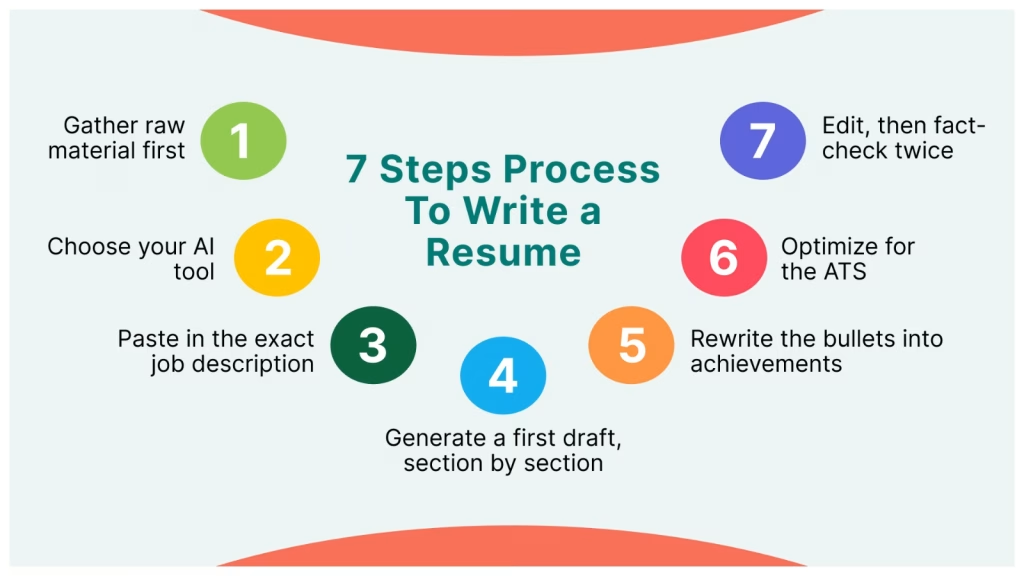
This is the repeatable workflow we recommend. Follow it in order. Each step builds on the one before, and skipping the early steps is why most AI resumes come out generic.
Step 1: Gather your raw material first
Before you open any tool, collect the facts the AI cannot invent: your job titles, dates, companies, responsibilities, and above all your measurable achievements. Numbers are gold. “Managed social media” is weak. “Grew Instagram from 4,000 to 22,000 followers in 11 months” is strong. If you hand the AI vague inputs, it will hand you vague, made-up output. Garbage in, garbage out applies more to resumes than almost anything else.
Step 2: Choose your AI tool
Decide whether you want a general chatbot (flexible, free, great for rewriting) or a dedicated ai resume builder (structured templates, built-in formatting, ATS checks). Many people use both: a builder for structure and a chatbot for sharper wording. We cover specific picks in the next section, and you can browse current options in our AI writing tools category.
Step 3: Paste in the exact job description
This is the step most people skip, and it is the most important one. Give the AI the real job posting you are targeting. The AI can then match your experience to the language the employer actually used, which is the same language their ATS is searching for. A resume tailored to one specific role beats a generic “master resume” almost every time.
Step 4: Generate a first draft, section by section
Do not ask for a whole resume in one shot. Work in pieces: professional summary, then experience bullets, then skills. This gives you control and keeps the AI focused. Ask it to base every line strictly on the facts you provided, and to flag anything it is unsure about rather than inventing it.
Step 5: Rewrite the bullets into achievements
Feed your plain responsibilities back to the AI and ask it to reframe each as an accomplishment using the “action verb plus task plus measurable result” formula. This single move separates a memorable resume from a forgettable one. You will find exact prompts for this in the prompts section below.
Step 6: Optimize for the ATS
Ask the AI to compare your draft against the job description and list the important keywords and skills you are missing. Add the ones that are genuinely true for you. Then confirm the formatting is ATS-safe (more on that shortly).
Step 7: Edit like a human, then fact-check twice
Read every line out loud. Cut anything that sounds robotic or that you would be embarrassed to defend in an interview. Most importantly, verify every claim. AI tools sometimes “hallucinate,” meaning they invent details. There are real horror stories of ChatGPT inventing fake job titles and degrees when given messy input. You are responsible for every word on your resume, so check it as if your career depends on it, because it does.
The Best AI Tools for Writing a Resume
There is no single “best ai resume builder” for everyone. The right choice depends on who you are and what you need. Here is how the main options break down, and which type of job seeker each suits best.
General AI chatbots (ChatGPT, Claude, Gemini)
These are the most flexible and often the best free ai resume tools available. They excel at rewriting bullets, drafting summaries, tailoring to a job description, and answering follow-up questions. The trade-off is that they do not handle visual formatting or ATS checks for you. You bring the structure; they bring the words. To pick the right model for writing specifically, see our ChatGPT vs Claude vs Gemini comparison.
Dedicated AI resume builders
Purpose-built platforms combine templates, one-click formatting, and ATS scoring in one place. They are ideal if formatting stresses you out or you want a polished layout without touching a design tool. Many offer a free ai resume builder tier with paid upgrades for extra templates and exports.
AI writing assistants (Jasper and similar)
Tools built for professional writing, such as Jasper, shine when you want a consistent, polished tone across your resume, cover letter, and LinkedIn profile. They are popular with marketers and creators who care about voice.
Here is a quick guide to matching the approach to the person:
| You are | Best AI approach | Why it fits |
A student or first job seeker | Free chatbot plus a free ai resume builder template | Zero budget, needs structure and help turning thin experience into strong bullets |
An entrepreneur or founder | Chatbot for wording, writing assistant for tone | Needs to translate a non-linear career into a clear, credible story |
A marketer or creator | AI writing assistant like Jasper | Voice and polish matter; consistency across resume, cover letter, and profile |
A developer or technical hire | Chatbot plus manual ATS keyword check | Precise skills and tool keywords matter more than prose |
A career changer | Chatbot with heavy tailoring per role | Needs to reframe transferable skills for a new industry’s language |
You can explore and compare current tools by use case in the Vhiz AI writing tools and AI productivity tools categories, or browse the full directory of AI tools to find one that fits your workflow.
How to Beat the ATS With AI
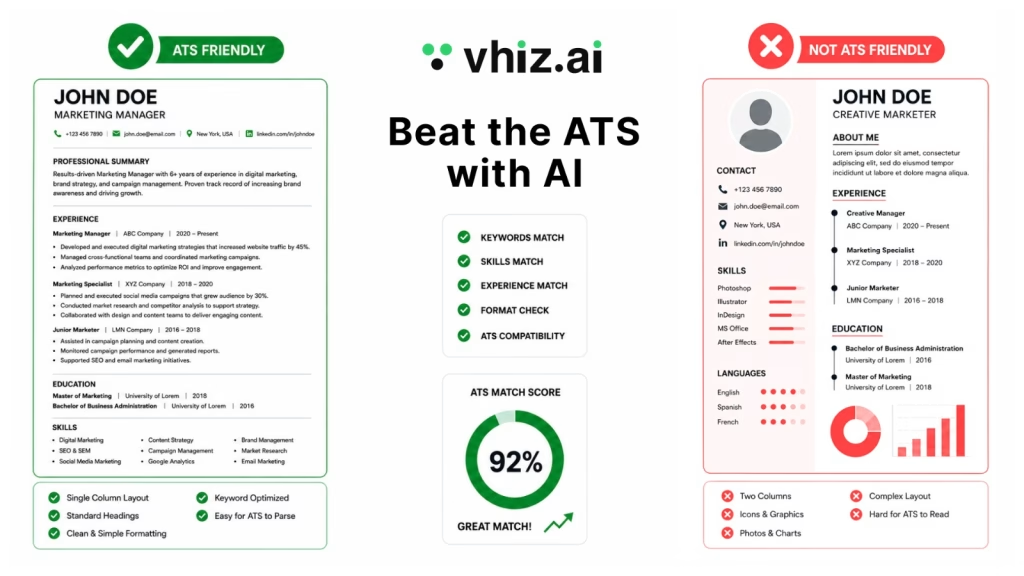
What is ATS Format
An ATS (Applicant Tracking System) format is a resume layout designed to be easily read and processed by recruitment software. It uses a clean structure, standard headings, and simple formatting so your qualifications can be accurately parsed and matched to job requirements. An ATS-friendly resume improves your chances of reaching a recruiter instead of being filtered out during the initial screening.
Since software screens your resume first, “beating the ATS” is really about making your resume easy for a machine to read and rank. AI is excellent at this if you point it in the right direction. Two things matter most: keywords and formatting.
Keywords: match the job, honestly
An ATS ranks you partly on how well your resume matches the job description’s language. If the posting says “project management” and your resume says “ran projects,” the system may not connect the two. Use AI to extract the exact skills and terms from the posting, then work the true ones into your resume naturally. Never add a keyword for a skill you do not have. That gets exposed in the interview.
Formatting: keep it clean and parseable
Fancy resume templates with columns, tables, text boxes, and graphics often confuse ATS parsers, which can scramble or drop your information. A simple, single-column layout is the safest choice. Here is a clear breakdown:
| Do this (ATS-safe) | Avoid this (parser-breaking) |
Single-column layout | Two or three column layouts |
| Standard section headings (Experience, Education, Skills) | Creative headings the system will not recognize |
| Standard fonts and simple bullet points | Graphics, icons, logos, and photos |
Text-based content | Text hidden inside images or text boxes |
| Common file types your target accepts (usually .docx or PDF) | Unusual formats or heavily designed PDFs |
Dates and titles in plain, consistent format | Tables and columns for your work history |
Pro tip: keep one beautifully designed version for humans (to hand over in person or attach when a real recruiter asks) and one clean, plain version for online applications that pass through an ATS. AI can generate both from the same content in minutes.
AI Resume Prompts That Actually Work
The quality of your AI resume depends almost entirely on the quality of your prompts. Vague prompts produce vague resumes. Below are five prompts we have refined through testing that consistently produce strong, human-sounding output. Copy them, fill in the brackets, and always edit the results.
Prompt 1: The keyword extractor
“Here is a job description: [paste it]. Act as an expert recruiter. List the top 15 hard skills, soft skills, and keywords an applicant tracking system would likely scan for in this role. Group them by category and mark which ones are essential versus nice-to-have.”
Prompt 2: The bullet-point rewriter
“Rewrite each of these responsibilities as an achievement using the formula: strong action verb plus what I did plus a measurable result. Only use facts I provide. If a metric is missing, leave a placeholder like [add number] instead of inventing one. Here are my responsibilities: [paste them].”
Prompt 3: The professional summary
“Write three versions of a two-sentence professional summary for a [target job title]. Base it only on this experience: [paste key achievements]. Make it specific and confident, avoid cliches like ‘results-driven’ and ‘proven track record,’ and naturally include these keywords: [paste 3 to 5 keywords].”
Prompt 4: The tailoring pass
“Here is my current resume: [paste]. Here is the job I am applying for: [paste description]. Rewrite my resume to align with this specific role. Reorder and reword my experience to highlight the most relevant parts, add any true keywords I am missing, and tell me clearly what is missing that I should consider adding.”
Prompt 5: The reality check
“Act as a skeptical hiring manager for [role]. Review this resume and tell me: what is unclear, what sounds generic or AI-written, which claims I would struggle to back up in an interview, and the three weakest bullet points. Be blunt. Resume: [paste].”
Why this matters: these prompts keep the AI anchored to your real experience, force it to produce specifics, and build in a self-editing step. That combination is what turns a robotic draft into a resume that reads like you on your best day.
The Biggest Mistakes People Make With AI Resumes
AI is powerful, but it is easy to misuse. These are the mistakes we see most often, and how to avoid each one.
Mistake 1: Pasting AI output without editing
Unedited AI text has a recognizable flavor: perfectly balanced, slightly hollow, and identical to everyone else’s. Recruiters notice. Always rewrite in your own voice and add specifics only you would know.
Mistake 2: Letting the AI invent things
AI tools can fabricate job titles, dates, and even degrees, especially when given messy input. Every claim on your resume must be true and defensible. Fact-check line by line.
Mistake 3: Keyword stuffing
Cramming in every keyword from the job description makes your resume unreadable and can backfire. Include the terms that genuinely apply to you, worked into natural sentences.
Mistake 4: Forgetting the human reader
Optimizing only for the ATS produces a robotic document that loses the person who reads it next. You are writing for two audiences: a machine that scans for keywords, and a human who decides in seconds whether you are worth a conversation. Serve both.
Mistake 5: Using one resume for every job
The whole advantage of AI is that tailoring, which used to take an hour, now takes five minutes. Use that. A resume matched to the specific role consistently outperforms a generic one.
Can Employers Tell You Used AI?
This is the question almost every job seeker asks in 2026, and the honest answer is: sometimes, and it depends entirely on how you use it.
Hiring managers are more confident than accurate. In a TopResume survey reported by the US Chamber of Commerce, only about a third of hiring managers said they could quickly spot an AI-written resume, and roughly one in five said they would reject a resume that was obviously AI-generated. What they are actually detecting is not “AI.” It is generic, personality-free writing. A resume that reads like a textbook example, with flawless parallel structure and zero specifics, raises a flag whether a human or a machine wrote it.
The practical rule that works: use AI for roughly 20 to 40 percent of the job. Let it handle structure, keyword optimization, and first drafts. You provide the substance, the real numbers, the company names, the specific results, and the final voice. Used that way, “did you use AI” becomes irrelevant, because the finished resume is unmistakably yours. Many hiring managers consider AI-assisted proofreading and drafting perfectly acceptable; what they object to is a submission that is entirely machine-generated and says nothing real.
Important distinction: using AI to help write and format your resume is widely accepted. Using AI to fake skills, fabricate experience, or cheat live assessments and interviews is dishonest and increasingly detectable. The line is simple: AI can help you present the truth better. It should never help you invent a lie.
Who Should Use AI for Their Resume (and Who Should Be Careful)
AI resume writing helps almost everyone, but some groups gain the most, and a few should proceed with extra care.
Who benefits most
- Students and new graduates who need to turn limited experience into confident, well-structured bullets.
- Career changers who must translate skills from one industry into another industry’s language.
- Busy professionals and entrepreneurs who are applying to many roles and need to tailor fast.
- Non-native English speakers who want polished, natural phrasing and grammar.
- Anyone facing the ATS, which today is almost everyone applying online.
Who should be careful
- Senior executives, whose resumes rely on nuanced leadership narrative that generic AI can flatten. Use AI to draft, then heavily personalize.
- People in highly regulated or security-sensitive fields, who must be certain no confidential detail is pasted into a public AI tool.
- Anyone tempted to over-rely on it, because a resume that is 100 percent AI and zero percent you is the one that gets filtered out for sounding like everyone else.
If you are an entrepreneur or small business owner, note that the same AI skills transfer well beyond your resume. The AI business tools in our directory can help with everything from proposals to hiring once you are on the other side of the table.
Write Your Resume Faster With the Right AI Tools
Knowing how to write a resume with AI is one thing. Having the right tool in front of you is what makes it fast. The AI landscape moves quickly, and the “best” resume tool six months ago may not be the best today, which is exactly the problem Vhiz AI exists to solve.
We are an independent AI discovery platform that tests, categorizes, and compares AI tools by real use case, so you do not have to wade through hype and affiliate noise to find what works. Whether you want a free ai resume builder, a general chatbot for rewriting bullets, or a polished writing assistant for your whole application, you can compare current options side by side instead of guessing.
Frequently Asked Questions
Can I write a resume with AI for free?
Yes. Several strong options cost nothing to start. General chatbots like ChatGPT, Claude, and Gemini have free tiers that handle rewriting, tailoring, and summaries well. Many dedicated resume platforms also offer a free ai resume builder tier that covers a basic template and download, with paid upgrades for extra templates and exports. For most job seekers, a free chatbot plus a free template is enough to produce a polished, ATS-ready resume without spending a cent.
What is the best AI to write a resume?
There is no single best ai resume builder for everyone. General chatbots are the most flexible and free, dedicated builders are best if you want formatting and ATS checks done for you, and writing assistants like Jasper are ideal when tone and polish matter. The right pick depends on your budget, your industry, and whether you struggle more with wording or with layout. Comparing a few by use case, which is what the Vhiz directory is built for, is the fastest way to decide.
Will employers know if I used AI to write my resume?
Only if you use it poorly. Research shows most hiring managers overestimate their ability to detect AI, and what they actually notice is generic, personality-free writing rather than “AI” itself. If you paste raw AI output with no edits, it can look obvious. If you use AI for structure and keywords, then rewrite everything in your own voice with real numbers and specifics, the finished resume reads as authentically yours and the question becomes irrelevant.
Is it cheating to use AI to write a resume?
No, as long as everything on the resume is true. Using AI to phrase your real experience more clearly is widely accepted, much like using spell check or hiring a resume writer. It crosses a line only when you use it to fabricate skills, invent experience, or misrepresent yourself. The simple rule: AI can help you present the truth better, but it should never help you tell a lie. Used honestly, it is a legitimate and increasingly common tool.
How do I make my AI resume pass the ATS?
Focus on keywords and formatting. Ask the AI to pull the important skills and terms from the specific job description, then work the true ones into your resume naturally. Use a clean, single-column layout with standard section headings and no tables, graphics, or columns, since those confuse many parsers. Save it in a file type the employer accepts, usually .docx or a simple PDF. This keeps your resume both readable by the software and rankable against the job.
Can ChatGPT write my whole resume?
It can produce a full draft, but you should not submit that draft as is. ChatGPT works best when you give it your real achievements and the target job description, then build the resume section by section and edit heavily. Left to fill in gaps on its own, it can invent titles, dates, or results, which is dangerous on a document you must defend in an interview. Treat it as a fast drafting partner, not a hands-off ghost writer.
What information should I give the AI?
Give it the facts it cannot know or invent: your job titles, employers, dates, key responsibilities, and above all your measurable achievements. Numbers matter most, so include percentages, dollar figures, timeframes, and volumes wherever you can. Also paste the exact job description you are targeting so the AI can match your experience to the employer’s language. The more specific and truthful your input, the stronger and more tailored the output.
How long should a resume be in 2026?
For most people, one page is ideal, and two pages are acceptable if you have roughly ten or more years of relevant experience. Recruiters spend only seconds on the first scan, so concise and well-organized beats long and dense every time. Use AI to tighten wordy bullets and cut anything that does not support your target role. If a second page exists, assume it will not be read until after your first page has already earned a closer look.